





Why Your Home Office Is Hurting Your Neck and Back
Many home workers do not realize how quickly a poorly arranged workstation translates into chronic neck and back pain. Forward head posture, caused by screens placed too low, forces neck muscles to carry considerably more load than usual.
Laptops worsen this problem by combining a low screen with a short viewing distance. Long, uninterrupted sitting sessions allow spinal support muscles to fatigue, encouraging slouching that strains the lower back and shoulders simultaneously. Stress tests can help identify individual resilience patterns that influence how people respond to prolonged ergonomic strain.
Desks set at the wrong height add further stress by forcing unnatural arm and shoulder positions. Recognizing these specific triggers is the essential first step toward meaningful improvement. Nearly 50 percent of the working population in the United States is estimated to work from home, making these ergonomic challenges an increasingly widespread concern.
Experts recommend taking breaks from sitting every 30–60 minutes to reduce prolonged strain on the spine and supporting muscles.
Set Up Your Chair for All-Day Spine Support
Getting chair setup right before anything else makes a meaningful difference in how the body holds up across a full workday.
Start by adjusting seat height until feet rest flat on the floor and knees sit near 90 to 100 degrees. Improved focus from better posture can reduce work-related stress and boost productivity.
Seat height is set correctly when feet rest flat on the floor and knees fall near 90 degrees.
Sit fully back so hips contact the backrest, then position lumbar support at belt-line level, where the spine curves naturally inward.
Leave two to three finger-widths between the seat edge and the backs of the knees.
Finally, set armrests near elbow height to keep shoulders relaxed. Armrests set too high pull the shoulders upward and create tension that builds throughout the day.
Each adjustment builds on the last, creating stable, consistent support throughout the day. Most chairs hold up well for years, but replace every 5–10 years when sagging cushions or broken mechanisms cause support to fail.
Get Your Desk and Monitor Height Right
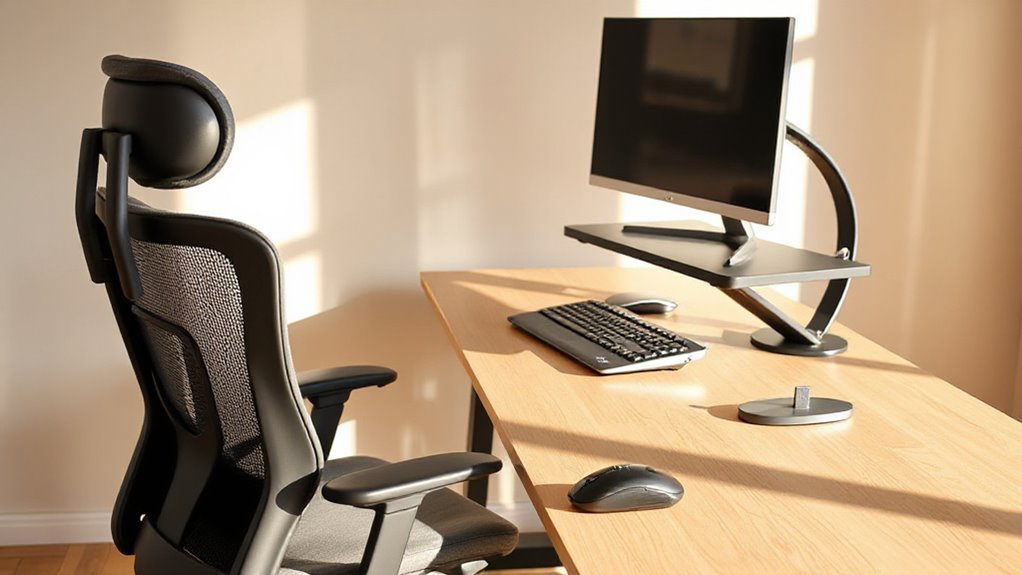
Once the chair is dialed in, desk and monitor height become the next critical variables in building a setup that protects the neck, shoulders, and wrists across long work sessions.
- Monitor top edge should sit at or just below eye level, encouraging a slight natural downward gaze.
- Screen distance should stay roughly 20–28 inches away, centered directly in front.
- Desk height should allow elbows to rest near 90°, keeping forearms parallel to the floor.
- A slight 10–20° backward monitor tilt reduces unnecessary neck flexion during extended use.
Poor monitor placement can force awkward postures that contribute to work-related musculoskeletal disorders, as well as eyestrain symptoms such as eye irritation, blurred vision, and headaches.
Most standard desk setups require raising the monitor 3–6 inches above where the built-in stand leaves it, making a monitor riser or monitor arm a practical necessity rather than an optional upgrade for achieving correct eye-level alignment. A centralized setup also helps teams work across locations and time zones with real-time editing of shared documents and resources.
Fix the Small Ergonomic Gaps That Cause the Most Pain
Even a well-configured desk and chair can fall short if smaller ergonomic details go unaddressed.
Feet left dangling without floor contact tilt the pelvis backward, straining the lower back; a footrest corrects this immediately. Using a footrest also helps maintain consistent posture and reduces pressure on the ischial tuberosities sitting bones.
Dangling feet tilt the pelvis, straining the lower back — a simple footrest restores alignment instantly.
Keyboards and mice placed too far forward force shoulder and neck overreach, so keeping input devices close and wrists straight reduces that load substantially.
Armrests set too low leave shoulders elevated and tense throughout the day.
Lumbar support positioned too high, near the ribs rather than the small of the back, misses its purpose entirely.
Addressing each gap compounds into meaningful, lasting comfort. When the armrest height matches the desk surface within a few millimeters, the forearms stay supported and shoulder rotation asymmetry drops measurably across the workday.
Poor ergonomics can also contribute to conditions beyond muscle tension, including herniated discs and tendonitis, which develop gradually when structural misalignments go uncorrected over time.
How Often to Move and Which Stretches Actually Help
Prolonged sitting is one of the most consistent contributors to the stiffness and pain that build over a workday, and research suggests that how often a person moves matters as much as how well their workstation is configured.
- Stand briefly every 20 minutes to reset posture and interrupt tension buildup. Regular short breaks also help maintain productivity and reduce fatigue by preventing sustained muscle strain microbreaks.
- Add 1–2 minutes of movement every 30–60 minutes, such as short walks or position changes.
- Stretch the neck and shoulders daily using chin tucks, shoulder rolls, and scapular squeezes.
- Open the hips and thoracic spine every 1–2 hours to counter prolonged seated compression. Spinal discs experience up to 40% more pressure after more than 30 minutes of continuous sitting, making regular position changes a structural necessity rather than a preference.
Hip flexors tighten and shorten with prolonged sitting, pulling on the lower back and contributing to anterior pelvic tilt, which is why incorporating a standing hip flexor stretch into hourly movement breaks targets one of the most direct muscular causes of desk-related back pain.